In one afternoon, I turned two overflowing inboxes into a job-search command center: two AI agents, one tracker, and a daily briefing waiting for me before coffee. Here is where I started. In 30 days I had sent 464 applications, about 15 a day, mostly through an auto-apply service. Replies were landing in two Gmail accounts. Recruiter messages, rejections, assessment links, job alerts and right-to-represent (RTR) agreements were all mixed together with newsletters and piano-lesson inquiries for my side business.
I have spent 20 years running programs for other people. I finally noticed I was running a program for myself, with no PMO, no status report and no single source of truth. So I built one with AI agents. This post walks through exactly what I built, what it found, what went wrong, and how you can build your own.

Treat the job search like a program
The first step was not technology. It was writing down requirements, the same way I would kick off any engagement.
What I needed to know every morning:
- Which emails need my attention today: interview requests, assessments, recruiter replies, RTRs waiting for a signature
- How many applications went out each day
- How many companies said no
- Anything suspicious that looked like a scam
My data sources:
| Source | What it holds |
|---|---|
| Personal Gmail | Replies from companies, signed RTRs in the Sent folder |
| Professional Gmail | LinkedIn messages, recruiter outreach, auto-apply daily reports |
| Auto-apply service | A daily count of applications sent |
| Job boards | New postings I might fit |
The hardest requirement was the vague one: needs my attention. A rejection does not. An interview request does. A recruiter asking me to confirm a rate today definitely does. Defining that rule clearly made everything else work.
The design: two agents, one source of truth
The system has three parts that work in sequence every weekday morning. The job finder runs first at 6:45 AM, populating new leads. The email monitor follows at 7:45 AM, logging overnight activity. By the time I open my laptop, the briefing is already waiting.
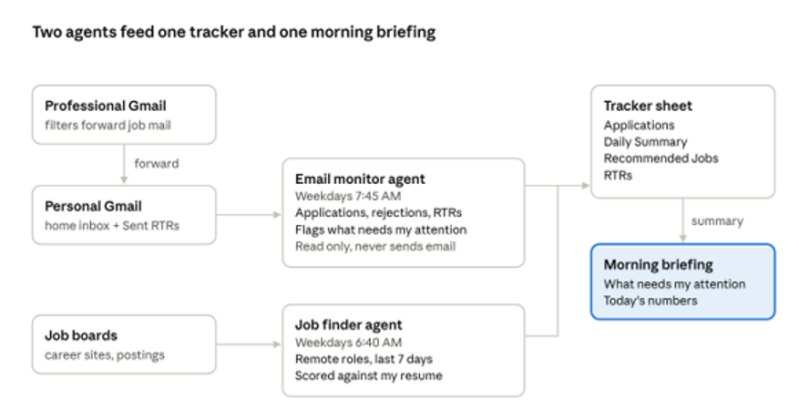
How the pieces connect · 2 agents, 1 tracker
The email monitor runs at 7:45 AM on weekdays. It reads new mail and my Sent folder, logs every application, rejection and RTR, and writes my morning briefing. The job finder runs an hour earlier. It searches for remote roles posted in the last week, scores each one against my resume, and adds the best matches to the tracker. Everything lands in one place, so the daily summary counts are always traceable.
How I built it, step by step
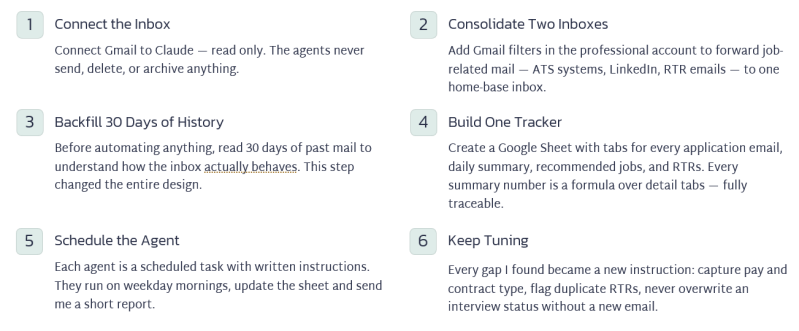
The whole build took less than a day of back-and-forth with Claude. I described what I wanted in plain English. Claude did the searching, reading, sorting and setup, and asked me before anything it could not undo.
- Connect the inbox. I connected Gmail to Claude so it could read my email. Read only: the agents never send, delete or archive anything.
- Consolidate two inboxes into one. A connector signs in to one account at a time. I added Gmail filters in my professional account that forward job-related mail to my personal account: applicant-tracking systems, job boards, LinkedIn messages and RTR emails.
- Backfill the last 30 days. Before automating anything, Claude read 30 days of history in both accounts. That baseline showed how my mail actually behaves, which changed the design (more on that below).
- Build one tracker. Claude created a Google Sheet with tabs for every application email, a daily summary, recommended jobs and RTRs. Every count on the summary tab is a formula over the detail tabs, so the numbers can be traced.
- Schedule the agents. Each agent is a scheduled task with written instructions. They run on weekday mornings, update the sheet and send me a short report.
- Keep tuning. Every gap I found became a new instruction: capture pay and contract type, flag duplicate RTRs, never overwrite an interview status without a new email.
What the data showed
Volume was never my problem: 482 applications went out in 31 days. Results were the problem. Over the same stretch I logged about 135 "not selected" emails, one phone screen, and at least nine signed RTRs with staffing agencies.

Daily application reports from the auto-apply tool · Oct 11 to Nov 10, 2026
The backfill also turned up surprises I would never have caught by hand:
- Replies were not where I expected. My auto-apply tool submits from a relay address and forwards employer replies to my personal inbox, so the account I checked most saw almost none of them.
- Gmail groups strangers together. One "Thank You For Applying!" thread held 24 emails from about 20 different companies. One of them was a rejection.
- Rejection language is slippery. Some confirmation emails say "if you are not selected, you will no longer be considered," which looks like a rejection to a simple keyword search.
- Scams are real. The agents flagged a "recruiter" using a personal Gmail address, a look-alike company domain offering $70 an hour if I would "reply to confirm," and a lead-generation site sending fake interview requests.
- RTRs carry risk. Two agencies pitched me for the same Johnson & Johnson role on the same day. Signing both can get a candidate disqualified, so the agent now warns me about duplicates.
What a program manager learns from building agents
Requirements evolve, so write them down. My first request was a daily email summary. Within a day I had added pay and contract type, recommended jobs, RTR tracking and duplicate-submission checks. Each change was one paragraph added to an agent's instructions. That is change control, just faster.
- Baseline before you automate. The 30-day backfill showed that most replies went to my other inbox, that the auto-apply tool used a relay address, and that Gmail groups unrelated companies into one thread. Without that discovery, the counts would have been wrong from day one.
- Guardrails are part of the design. My agents only read email. They write to one spreadsheet. On its first morning, one run re-labeled an interview as a rejection with no email to support it. I fixed the row and added a rule: never change an existing status unless a new email gives a new outcome.
- Keep a human in the loop for anything irreversible. The agents flag. I decide. They never sign an RTR, reply to a recruiter or apply for a job.
- Accept good enough, and label it. Some company emails mix confirmation and rejection language. Rather than pretend to be exact, the tracker marks uncertain rows "verify", and the daily report reads each email before counting it.
- Expect plumbing problems. Google asked me to verify my phone before it would save a forwarding filter, and the first version of my RTR filter caught every email containing the word "to". Neither was hard to fix, but both took real time.
Build your own: a checklist and starter prompts
You do not need to code. You need a clear request, an AI assistant that can connect to your email and schedule tasks (I used Claude), and an afternoon.
- ☐ Write your requirements: what should a daily briefing tell you, and what counts as "needs my attention"?
- ☐ Pick one inbox as home base and forward job mail from any others with Gmail filters
- ☐ Connect the assistant to that inbox, read only
- ☐ Ask for a 30-day backfill before you automate anything
- ☐ Create one tracker spreadsheet with a detail tab and a summary tab
- ☐ Schedule a weekday morning report that updates the tracker first
- ☐ Add guardrails: no sending, no deleting, no overwriting existing rows
- ☐ Review the first week of reports and turn every gap into an instruction
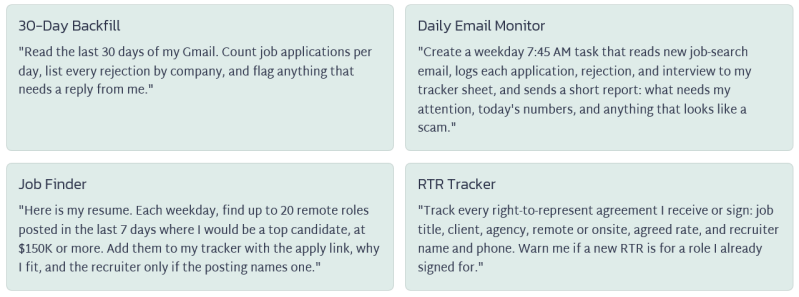
Starter prompts you can adapt:
One caution: an agent is only as good as its instructions and its data. Read the first few reports closely, and keep sensitive actions in your own hands.
The real payoff: attention, not automation
The agents did not get me a job. What they gave me is my mornings back. Instead of scrolling through dozens of emails, I read one briefing that tells me who is waiting on me, what to sign, what to ignore, and which new roles fit.
If you are in a long job search, you are already running a program. Give it a PMO. Start with one agent and one spreadsheet, and add to it as your needs change.
If you build your own, I would love to hear what you automated first. Leave a comment or message me on LinkedIn.
#JobSearch #AIAgents #ProjectManagement #PMO #OpenToWork #CareerTips #Automation #GenerativeAI #AgenticAI #NoCode #FutureOfWork #PMP #AgileProjectManagement #ProgramManagement #DigitalTransformation #JobSeekers #ContractJobs #ManageProjectsTheAgileWay
About the Author

Kimberly Wiethoff, MBA, PMP, PMI-ACP is a Senior Program Manager specializing in enterprise digital transformation, AI-enabled delivery, PMO leadership, and Agile program execution. Through Managing Projects the Agile Way, she shares practical strategies that help organizations modernize project delivery while preparing leaders for the future of AI-enabled program management.
Download Document, PDF, or Presentation
Author: Kimberly Wiethoff, MBA, PMP, PMI-ACP