A recruiter emails about a promising role. Another agency sends what looks like the same opening. An interview invite lands while I’m checking whether a client ever received my résumé. Each task is small, but together they create a familiar program management problem. The work arrives through several channels, and every handoff leaves room for a missed decision or duplicate action.
What If You Started Your Job Search with a Morning Briefing?
Before my first cup of tea/coffee, I can see which roles are worth a closer look, which recruiters are due for a follow-up, and which replies are ready for me to review.
I built a five-agent AI team to do the prep work. I still decide where to apply, who to contact, and when to hit Send.
Continue reading to see how I set it up and what I learned in the first week.
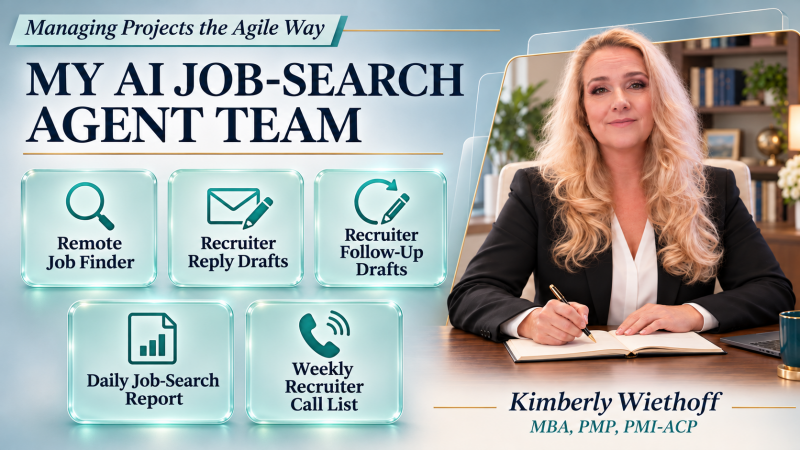
I set up my job search the way I’d set up a delivery program. I gave each recurring task an owner, put the work in one tracker, and set a cadence for deciding what needed my attention. I used five scheduled Claude tasks to handle the research and preparation. I still choose which jobs to pursue, which messages to send, and which right-to-represent requests to sign.
That division of work made the first week useful. The drafts showed exactly where I’d left room for interpretation, including what counted as a local commute and how to respond to a rate below my minimum.
Overview
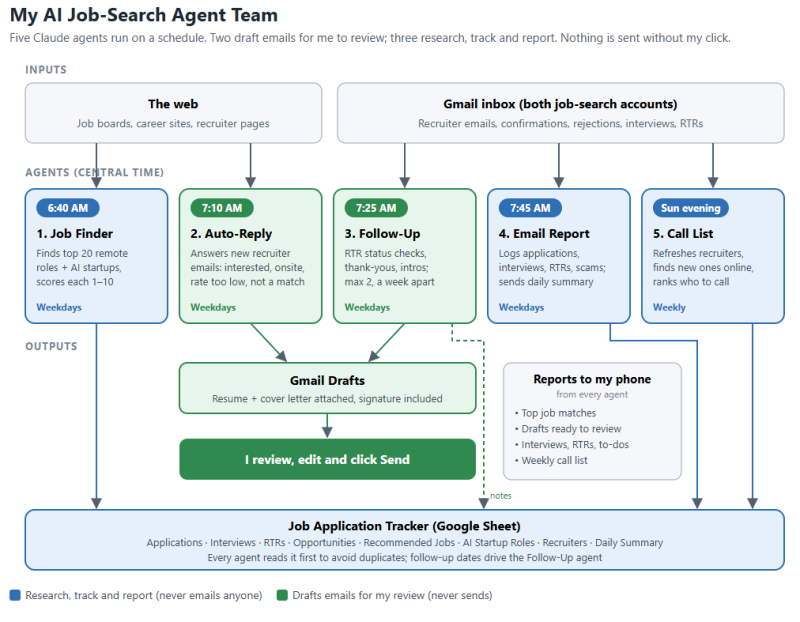
Five Claude scheduled tasks run my job search: one finds roles, two draft emails for me to review, and two keep a Google Sheet tracker current and send me reports. None of them sends email on its own; every outgoing email waits in Gmail Drafts until I review it and click Send.
| Agent | When it runs (Central Time) | What it does | Writes to | Sends email? |
|---|---|---|---|---|
| 1. Daily remote job finder | Weekdays 6:40 AM | Searches the web for the 20 best remote roles posted in the last 7 days, plus AI-startup roles | Recommended Jobs and AI Startup Roles tabs | No |
| 2. Recruiter email auto-reply | Weekdays 7:10 AM | Drafts replies to eligible first-contact recruiter emails: interested, can't do onsite, rate too low, or not a match | Gmail Drafts | No (drafts only) |
| 3. Recruiter follow-up drafts | Weekdays 7:25 AM | Drafts RTR status checks, thank-you follow-ups and introductions when a follow-up date arrives | Gmail Drafts + a note on the Recruiters tab | No (drafts only) |
| 4. Daily job-search email report | Weekdays 7:45 AM | Reads all job mail, logs applications, rejections, interviews, RTRs and opportunities, and sends me a summary | Applications, RTRs, Opportunities, Interviews, Daily Summary tabs | No |
| 5. Weekly recruiter call list | Sundays 6:47 PM | Refreshes the Recruiters tab and gives me a prioritized call list for the week | Recruiters tab | No |
The agents share one tracker spreadsheet and one Google Drive folder that holds the resume and cover letter. The order matters: the auto-reply and follow-up agents run before the 7:45 report, so the report follows my morning draft review window.
Setup before you build
You need a Claude plan with scheduled tasks, three connectors, one tracker spreadsheet and one Drive folder. Do these once, then paste each prompt below into Claude and ask it to create a scheduled task.
- Connect Gmail, Google Sheets and Google Drive in Claude. If you use a second job-search email address, set up a Gmail filter there that forwards job mail to your main inbox, so one inbox covers both.
- Create a Google Sheet called "Job Application Tracker" with these tabs (the prompts list each tab's columns, so Claude can add the headers for you):
- Daily Summary
- Applications
- RTRs
- Opportunities
- Recommended Jobs
- AI Startup Roles
- Interviews
- Recruiters
- Create a Google Drive folder (mine is "Recruiter Reply Agent - Attachments") and upload your resume as a PDF and your cover letter as a .docx. Keep the cover letter general, with no company name, because it goes with every email.
- Collect the IDs the prompts need: the spreadsheet ID (the long code in the sheet's URL between /d/ and /edit), the Drive file IDs for the resume and cover letter, and the folder ID. Claude can look these up for you once Drive is connected.
- Replace every [BRACKETED] placeholder in the prompts with your own details: name, emails, city and nearby suburbs, target titles, minimum rate, signature, and the IDs.
- Ask Claude to create each scheduled task with the prompt and time shown. After it's created, open the task's settings and turn on "Automatically approve" if your account allows it; otherwise a run can stop and wait for your approval.
- Run each new task once by hand and check its first report or drafts before trusting it.
The prompts are written to read your mail and draft replies, never to send. Keep recruiter email in drafts, and use the first week of reviews to refine the rules.
Agent 1: Daily remote job finder
Every weekday at 6:40 AM it searches the web for up to 20 strong remote roles posted in the last 7 days, scores each 1 to 10 against my resume, and adds the ones scoring 7+ to the Recommended Jobs tab. It also looks for up to 10 program-management roles at AI startups. It never applies or contacts anyone.
- Reads: job boards and company career pages (web search), plus the tracker so it never repeats a job or suggests one I already applied to.
- Writes: Recommended Jobs and AI Startup Roles tabs.
- Report: a message with the top 10 matches (score, title, company, pay, link) and up to 5 AI-startup roles.
Schedule: weekdays, 6:40 AM your time.
See Appendix for Agent 1 prompt.
Agent 2: Recruiter email auto-reply
I call this auto-reply in the setup, but its output is a draft. It handles eligible first-contact emails and puts exceptions in the review report.
Every weekday at 7:10 AM it reads new first-contact recruiter emails and drafts one of five replies, each with my resume and cover letter attached. It never sends; every reply waits in Gmail Drafts for me.
| Situation | Reply it drafts |
|---|---|
| Skills match, remote or local, rate OK or not stated | Interested; asks for the best W2 rate or salary range |
| Skills match, onsite somewhere else | Can't meet the onsite requirement in that location; asks to be considered for remote roles |
| Skills match, remote or local, hourly rate below my minimum | The rate is below my $[MIN]/hour minimum; open to future roles that pay at least that |
| Not a match, remote or local | Not a match for my skillset; interested in future remote PM roles |
| Not a match, onsite somewhere else | Can't do the onsite location and not a match for my skillset |
It skips LinkedIn messages, job alerts, application-system emails, RTR requests, interview scheduling, threads I'm already in, staffing emails meant for other vendors, gig offers and scams. Those it lists for me instead. If three recruiters from one agency send the same role, it drafts only one reply.
Schedule: weekdays, 7:10 AM (before the 7:45 report).
See Appendix for Agent 2 prompt.
Agent 3: Recruiter follow-up drafts
Every weekday at 7:25 AM it checks the Recruiters tab for anyone whose follow-up date has arrived and drafts a follow-up email with my resume and cover letter attached. It writes three kinds of emails:
- RTR status check, for active right-to-represent submissions signed in the last 45 days: asks for client updates and next steps.
- Thank-you follow-up, for every other recruiter I've been in touch with: thanks them for connecting, says I'm looking, and asks to be considered.
- Introduction, for recruiters found online who have never contacted me.
Guardrails:
- At least 1 week between follow-ups to the same person.
- At most 2 unanswered follow-ups. After that it stops and writes "Max follow-ups reached" on the tracker, and the count starts over if the recruiter writes back.
- It skips anyone I've emailed or heard from in the last 7 days, and anyone who already has a draft waiting.
- It notes "Follow-up drafted [date]" on the Recruiters tab and never edits my own notes column.
Schedule: weekdays, 7:25 AM.
See Appendix for Agent 4 prompt.
Agent 4: Daily job-search email report
An RTR, or right-to-represent request, asks me to authorize a staffing firm to submit me for a role. A possible duplicate is a decision for me to review before signing.
Every weekday at 7:45 AM it reviews job-search email that came in or went out in the last 24 hours (since Friday morning on Mondays), updates the tracker, and sends me a short report. It is read-only for email: it never sends, replies, labels or deletes anything.
What it tracks:
- Applications: confirmations, rejections, closed positions, assessments, plus application counts from auto-apply services if you use one.
- Interviews: pulls the date, time, interviewer and meeting link out of calendar invites, and reminds me about thank-you notes.
- RTRs: captures rate, client, recruiter and phone, and warns me if two agencies want to submit me for the same role.
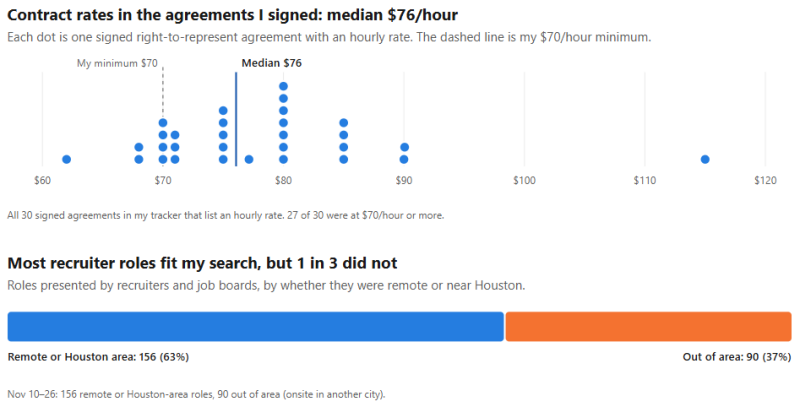
- Opportunities: logs every recruiter email and job-board match, marked remote, local or out of area.
- Scams: flags free-email recruiters, mismatched domains and requests for SSN or bank details.
The report puts "Needs your attention" first (upcoming interviews, RTRs to sign, recruiter questions, assessments), then the day's numbers, new remote/local roles, and anything suspicious.
Schedule: weekdays, 7:45 AM.
See Appendix for Agent 4 prompt.
Agent 5: Weekly recruiter call list
Every Sunday evening it refreshes the Recruiters tab and sends me the week's call list. It updates each recruiter's last-contact date from Gmail and adds new recruiters from the past week. It also finds up to 8 new recruiters online who specialize in my target roles. It never contacts anyone; it only updates the sheet and reports.
Each recruiter gets a priority:
- Active RTR
- Warm (I replied)
- Older RTR to reconnect
- Cold (they emailed me)
- New, found online
The Follow-up due column (last contact + 7 days) is what Agent 3 uses to draft follow-ups. The report gives up to 10 people to call first, with a suggested opening line for each.
Schedule: Sundays, evening.
See Appendix for Agent 5 prompt.
Tips and lessons learned
Start with drafts only, and keep it that way. Reviewing a morning batch of drafts takes a few minutes, and it caught real mistakes in my first week.
- Iterate on the rules like a backlog. My first version missed a "rate too low" reply, counted ServiceNow leads as "not a match", and treated The Woodlands as local even though it's too far for me. Each fix was one sentence added to the prompt.
- Spell out your match list. List the exact titles that count and the ones that don't; "PM roles" is too vague for consistent results.
- Define local precisely. Name the suburbs you'd actually commute to, and the nearby ones you wouldn't.
- Give the agents a shared tracker. One sheet with fixed tabs and columns lets each agent build on the others' work, and you can see everything in one place.
- Protect your own columns. The prompts that write to tabs with personal notes tell the agents to leave those columns alone. Check the first runs to confirm the notes stay intact.
- Watch for duplicates. Several recruiters at one agency often send the same role. Reply once per agency, and never sign two RTRs for the same client and role.
- Order the schedule. Drafting agents run before the daily report so I have a window to review drafts before the daily report runs.
- If your setup offers “Automatically approve,” review which actions it covers. Scheduled runs can pause when approval is required.
- Keep the cover letter generic, with no company name, since it goes with every email.
The Role of the Program Manager
The program manager defines the handoffs and decides how exceptions move through the workflow. In my job search, the scout adds recommendations, the drafting tasks prepare messages, and the reporting tasks tell me what needs a decision. A row in the Recommended Jobs tab means I have a lead to review. A message in Gmail Drafts means I have a response to check. I count an application when I have evidence it was submitted.
The same distinction matters when several agents share a tracker. The Sunday task refreshes recruiter contact dates. The weekday follow-up task uses those dates to find candidates, then checks Gmail again before drafting. If a recruiter replied on Monday after the tracker was refreshed, that second check gives the task a chance to catch it. The daily email report reviews received and sent mail. A draft enters that part of the workflow only after I send it.
When a rule fails, I add a concrete example to the backlog and test the fix against a similar case. The Woodlands example gave me a clear acceptance criterion. A hybrid role there should be treated as out of area even though it’s in the broader Houston region.
How I’d Measure Whether It’s Helping
I’d start with one week of manual review and keep three measures. Run counts tell me whether the tasks executed. These measures tell me whether the output helped.
| Measure | What I’d track | Decision it supports |
|---|---|---|
| Time spent on job-search administration | Minutes spent reviewing listings, drafting messages, and reconciling the tracker before and after the pilot | Which tasks are actually giving me time back? |
| Drafts needing a material correction | Share of reviewed drafts where I had to fix the role, location, rate, recipient, or attachment | Which rule or input should I improve first? |
| Recruiter conversations and interviews by source | Conversations and interviews linked to a job finder recommendation, recruiter outreach, or another channel | Which channels deserve more of my attention? |
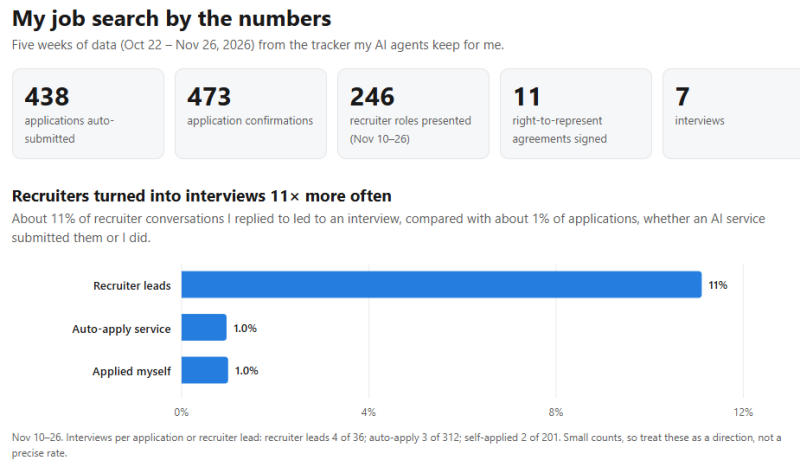
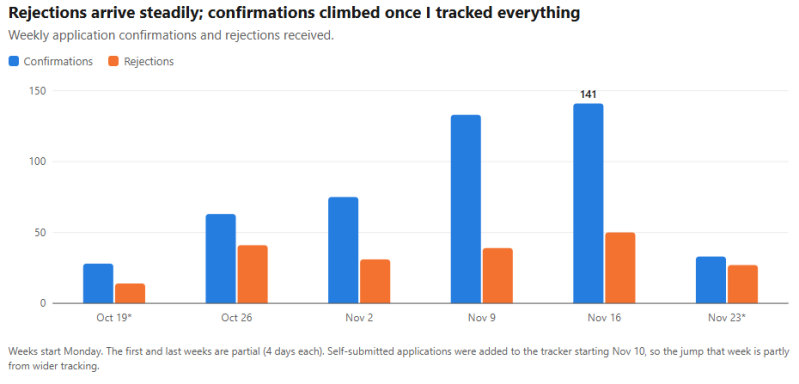
What the data shows
Questions to Ask Before You Build Your Own
- Which recurring task takes enough time to justify automating it?
- What can the agent read or update, and which decisions stay with you?
- How will you know whether a message was drafted, sent, or skipped?
- What should happen if a tracker refresh fails or the same role shows up twice?
- What result would make you keep the automation after a week of reviewing it?
If I were starting again, I’d begin with the daily job finder. I’d review its recommendations against the roles I’d actually pursue, use those examples to tighten the criteria, and add recruiter drafts once I had a reliable review routine.
Which part of your job search would you hand to an AI agent first, and what decision would you keep for yourself?
#AIJobSearch #AIAgents #JobSearchStrategy #CareerTransition #WorkflowAutomation #HumanInTheLoop #AgileProgramManagement #ManagingProjectsTheAgileWay
About the Author

Kimberly Wiethoff, MBA, PMP, PMI-ACP is a Senior Program Manager specializing in enterprise digital transformation, AI-enabled delivery, PMO leadership, and Agile program execution. Through Managing Projects the Agile Way, she shares practical strategies that help organizations modernize project delivery while preparing leaders for the future of AI-enabled program management.
Download Document, PDF, or Presentation
Author: Kimberly Wiethoff, MBA, PMP, PMI-ACP
Add comment
Comments