A legacy application often carries years of business knowledge inside its screens, approval rules, integrations, and workarounds. Replacing it requires understanding how people actually use it, including the exceptions that rarely appear in the documentation. That is where modernization projects can lose their footing. A team demonstrates a promising prototype, starts rebuilding screens, and discovers later that an undocumented approval rule or missing historical record affects a critical business process.
10 Step AI Assisted Playbook
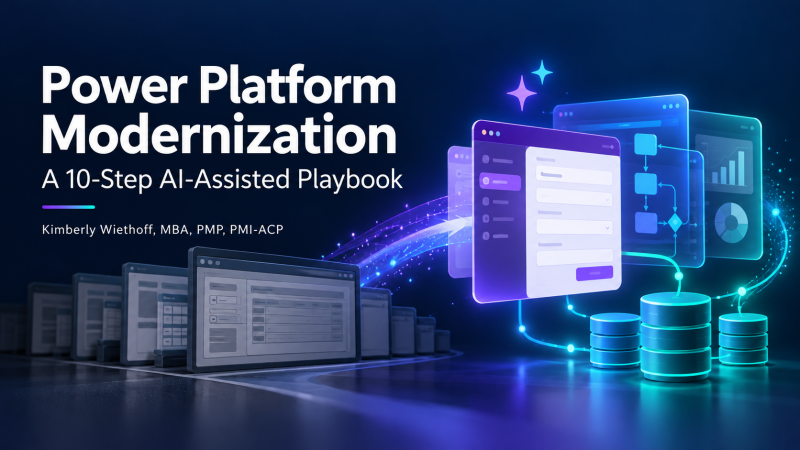
My two companion presentations provide a framework for managing that transition. Part 1, Power Platform Modernization: A 10-Step AI-Assisted Playbook, connects each delivery phase to concrete deliverables, measurable acceptance criteria, and practical opportunities for AI assistance. Part 2, Power Platform Modernization: Questions Leaders Should Ask & the Role of the Program Manager, explores the leadership decisions, program oversight, and operational responsibilities needed to guide modernization from planning through sustained support.
Together, they show how AI can support delivery while named business and technical owners remain accountable for validation and approval. For project managers and PMO leaders, the central question is: What evidence shows that we are ready to move to the next phase?
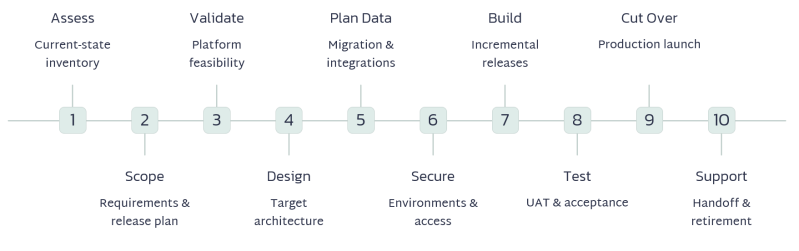
| Step/Key Deliverable | What Needs to Happen | How AI Can Help | Acceptance criteria |
|---|---|---|---|
| 1. Assess the current application / Current-state assessment | Inventory screens, workflows, business rules, reports, integrations, data, user roles, and known problems. Identify business and technical owners. | Summarize existing documentation and code, draft process maps, extract business rules, and identify gaps or questions for stakeholders. | All in-scope screens, workflows, business rules, reports, integrations, and data sources are documented. User roles and application dependencies are identified. Business and technical owners validate the assessment. |
| 2. Define the scope and success measures / Approved requirements and release scope | Decide which capabilities to retain, improve, or retire. Define the first release and measurable outcomes. | Turn stakeholder notes into requirements, user stories, and acceptance criteria. Flag duplicates, conflicting requirements, and unclear scope. | Every in-scope requirement has a unique ID, priority, owner, and testable acceptance criteria. First-release scope and exclusions are approved. Success measures have documented baselines and targets. |
| 3. Confirm Power Apps suitability / Feasibility decision and proof of concept | Evaluate volumes, performance, complex processing, offline needs, integrations, security, and licensing costs. Prototype high-risk functionality. | Create assessment checklists, identify potential constraints, and suggest prototype scenarios. Validate platform capabilities and licensing against current Microsoft guidance. | A proof of concept demonstrates the highest-risk business scenarios using representative data volumes. Performance meets agreed targets. Integration, security, licensing, and platform constraints are assessed, with no unresolved feasibility blockers. |
| 4. Select the application architecture / Target solution design | Choose canvas, model-driven, or a combination. Determine needs for Power Pages and Power Automate. | Draft architecture options, compare tradeoffs, and propose initial data models and workflow designs for technical review. | The application type, data platform, integrations, and automation approach are documented and approved. The design addresses required user journeys, access needs, error handling, and supportability. |
| 5. Plan the data and integrations / Data migration and integration plan | Decide which data stays or moves. Map tables, relationships, attachments, history, and interfaces. Define reconciliation rules. | Suggest field mappings, identify possible data-quality issues, and draft transformation logic, integration specifications, and reconciliation queries. | All in-scope data fields and relationships have approved mappings. A trial migration meets agreed record-count and accuracy thresholds. Required attachments and history are preserved. Integrations pass normal, failure, and recovery scenarios without unexplained data loss or duplication. |
| 6. Establish environments and security / Ready environments and approved access model | Set up development, test, and production environments. Configure access, security roles, connector policies, and deployment controls. | Draft role-access matrices, environment checklists, and deployment documentation. Flag potential permission gaps for security review. | Development, test, and production environments are configured. Tests confirm users can perform authorized actions and cannot access restricted data or functions. Connector policies are approved. A deployment rehearsal succeeds using environment-specific configuration. |
| 7. Build the application incrementally / Working application releases | Develop screens, forms, rules, approvals, notifications, integrations, and reports. Demonstrate functionality regularly. | Assist with Power Fx formulas, workflow logic, screen designs, and technical documentation. Explain errors and suggest fixes that developers test. | All first-release requirements are implemented and traceable to working functionality. Business rules, approvals, notifications, and reports behave as specified. Error messages are actionable. Product owners accept completed features. |
| 8. Test and obtain business acceptance / Test results and UAT signoff | Validate functionality, permissions, integrations, data accuracy, performance, accessibility, and critical business scenarios. Conduct UAT. | Generate test cases from requirements, suggest edge cases, create synthetic test data, and summarize defects and coverage gaps. | All critical business scenarios pass. No open critical or high-severity defects remain, unless an authorized exception is documented. Performance and accessibility meet agreed targets. Business representatives complete UAT and approve release readiness. |
| 9. Prepare and execute cutover / Approved cutover plan and production launch | Train users, rehearse migration, plan any outage, load final changes, validate production, and establish rollback criteria. | Draft cutover runbooks, training materials, communications, and rollback checklists. Analyze rehearsal results to identify missed dependencies. | The cutover rehearsal finishes within the planned window. Final data reconciliation passes. User access, training, support coverage, and communications are ready. Rollback triggers and responsibilities are documented and rehearsed. Production smoke tests pass before release to users. |
| 10. Transition to support and retire the old system / Operational handoff and retirement approval | Assign support ownership, provide documentation, monitor adoption and failures, complete hypercare, and retire the legacy application after acceptance. | Draft support guides and FAQs, summarize recurring incidents, analyze adoption feedback, and suggest improvements for the backlog. | The support owner accepts the runbook, access, monitoring, and escalation responsibilities. The support team demonstrates that it can resolve representative incidents independently. The application meets agreed stability targets for [X days]. Required legacy records are archived and retrievable before retirement approval. |
Questions Leaders Should Ask Before Modernization Begins
Before approving a Power Platform modernization initiative, leaders should establish a shared understanding of the business problem, investment, and operating responsibilities. The right questions surface hidden assumptions early before those assumptions become costly discoveries during delivery.
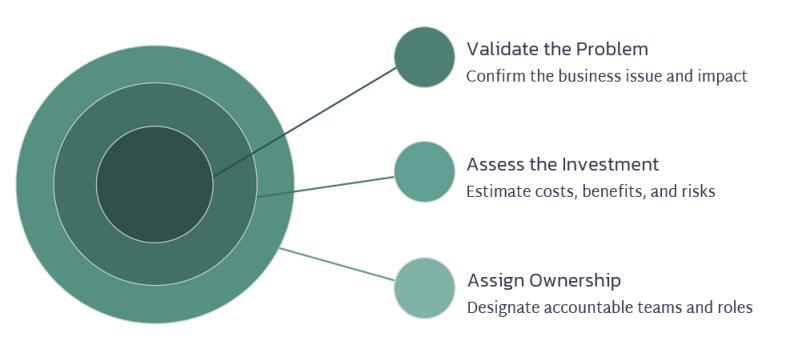
What business problem are we solving?
Identify the specific limitation driving modernization. Is the existing application slowing work, creating data errors, increasing support costs, or preventing needed changes? Define the outcome that would justify the investment.
What should we improve or retire before rebuilding?
Review whether existing workflows and approvals still serve a business purpose. Recreating unnecessary steps can carry years of inefficiency into the new application.
What evidence supports Power Platform as the right choice?
Ask the team to demonstrate the highest-risk requirements using representative workloads. Confirm that platform suitability, integrations, and licensing assumptions have received technical review.
Do we understand the full cost of ownership?
Include migration, licensing, training, support, and ongoing enhancements in the financial assessment. Identify who will fund the application after project funding ends.
Who owns the process, data, and release decisions?
Name the people authorized to approve requirements, resolve data-quality issues, accept risks, and authorize launch. Clarify how the team will escalate disagreements.
Where will AI help, and who will validate its outputs?
Identify approved uses of AI and the information teams may share with it. Assign qualified reviewers for generated requirements, formulas, mappings, and test cases.
What must be true before we launch and retire the legacy system?
Agree on measurable release criteria, rollback triggers, and archival requirements. Establish how the support team will demonstrate that it can operate independently.
These answers should shape the business case and delivery plan. Revisit them when scope, costs, or technical findings materially change.
The Role of the Program Manager
The program manager connects the modernization effort to business outcomes and coordinates the work across business, technology, security, and operations. Their responsibility includes making sure decisions happen at the right time and that evidence supports each transition.
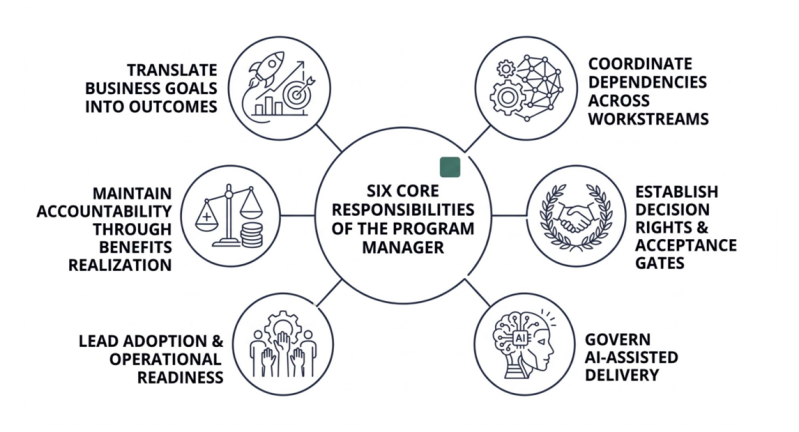
Translate Business Goals into Measurable Outcomes
Work with the sponsor and process owners to establish baselines and targets. Connect the delivery backlog to outcomes such as shorter processing times, fewer manual corrections, or improved access to reliable information.
Continue measuring after launch so leaders can assess whether the application delivers the expected benefit.
Coordinate Dependencies Across Workstreams
Application development depends on data readiness, integration availability, environment setup, security decisions, and user participation.
Maintain a clear view of these dependencies, with an owner and required date for each. Surface blocked decisions early and explain their effect on the release plan.
Establish Decision Rights and Acceptance Gates
Define who approves scope, architecture, data reconciliation, business acceptance, and production launch. Ensure each phase has an agreed deliverable and acceptance criteria.
Bring unresolved issues to the appropriate decision-maker with options and consequences. Record approved exceptions and the responsibilities attached to them.
Govern AI-Assisted Delivery
Ensure AI use follows the organization’s approved data-handling rules and review standards. Each AI-assisted deliverable should have a named owner responsible for its accuracy and acceptance.
Account for review effort in the delivery plan. Faster drafting only improves delivery when the team has enough capacity to validate the output.
Lead Adoption and Operational Readiness
Plan user involvement, training, and support preparation alongside development. Use feedback from demonstrations and testing to identify adoption barriers before launch.
Verify that support teams have the access, documentation, and practical experience needed to resolve incidents independently.
Maintain Accountability Through Benefits Realization
Track stability, adoption, and business outcomes through hypercare and the agreed transition period. Assign ongoing ownership for unresolved issues and future improvements.
The program manager’s work is complete when the organization has accepted a sustainable capability, demonstrated operational readiness, and established ownership for measuring its continuing value.
Keep AI Assistance Reviewable
The strongest starting opportunities in this playbook are documentation analysis, requirements drafting, development assistance, and test-case generation. Each produces an output that a qualified person can inspect and validate.
Apply the same quality standards to AI-assisted work as to other deliverables. Review generated content against source material, test generated logic, and validate proposed data mappings through reconciliation. Named owners should approve release decisions, regardless of how the supporting work was prepared.
For the PMO, a useful checkpoint is simple: What did AI help produce, who reviewed it, and what evidence supports its acceptance?
That question keeps modernization focused on a working business capability. The project succeeds when employees can complete their work, the organization can trust its data, and support teams can sustain the application after the project team leaves.
Use the companion presentations to guide planning discussions and phase reviews. Set each acceptance threshold around your application’s business needs and risk before delivery begins.
#PowerPlatform #PowerApps #PowerAutomate #ApplicationModernization #DigitalTransformation #AI #AIGovernance #ProgramManagement #ProjectManagement #PMO #ChangeManagement #BusinessTransformation #AgileDelivery #ManagingProjectsTheAgileWay

About the Author
Kimberly Wiethoff, MBA, PMP, PMI-ACP is an AI Transformation Program Leader specializing in enterprise digital transformation, AI-enabled delivery, PMO leadership, AI governance, Agile program execution, cloud transformation, and complex portfolio delivery.
Through Managing Projects the Agile Way, she shares practical strategies for modernizing project and program delivery, strengthening PMO leadership, and preparing organizations and leaders for the future of AI-enabled program management.
Power Platform Modernization: A 10 Step AI Assisted Playbook
Power Platform Modernization: Playbook Part 2
Download Document, PDF, or Presentation
Author: Kimberly Wiethoff, MBA, PMP, PMI-ACP